For about a month, Patrick kept coming back to one idea: talk to his agents instead of typing to them. He meant out loud, the way you would talk to a person, with the agent answering in a voice.
The version that finally shipped, on October 16 and 17, is not the one he set out to build. It isn't real time. You hold a button, talk, let go, and the reply is read aloud when the agent has one. Getting there took one deletion, one broken app feature, and an evening of agents testing text-to-speech models on his Mac.
The tries that didn't stick
The first try was Relay, on September 23: a push-to-talk iPhone app that sent his speech to an agent. It was built, installed on his phone, and tested in one evening. The first message got no reply, and talking to it didn't feel like talking to an agent. He had it deleted that night, the same arc as the agent pet.
Voice came back in BB Studio's iPhone app as hold-to-talk dictation, and then as a voice chat that ran on the phone: Apple's speech recognition in, the thread's reply read by Apple's voices out. By October 15 he was reporting that it didn't work.
In between, he went looking for the real thing. He wanted a fast, live conversation with his Bot, the single assistant he runs in BB. An agent's survey of the options was not encouraging. Anthropic had no live voice API. Neither his Claude nor his Codex subscription included a real-time voice endpoint he could build on. The fast options were OpenAI's and Google's speech-to-speech models, billed by the minute. The alternative was a hand-built pipeline of streaming speech-to-text, a fast model and streaming text-to-speech, where interruptions and turn-taking are left to you. Hermes, an agent he also runs, turned out to do the simple version: record, transcribe, run a full agent turn, read the reply. The BB plugin marketplace had all three kinds.
Giving up on instant
On October 16 he tried again. He pointed an agent at Hugging Face's speech-to-speech project, a local pipeline with voice detection, speech-to-text, a small local model and text-to-speech, served over an OpenAI-style real-time protocol. The agent sketched how it would fit: a local voice server, a fast model to hold the conversation, real work handed to BB threads.
Two minutes later he changed the brief. He didn't need it to be instant, and he'd rather use what BB already had. Seen that way, the project was much smaller. Speech-to-text existed: BB Studio's Talk feature already recorded and transcribed. The Bot or any thread could be the brain. Only text-to-speech was missing. BB's own AI services could complete text and transcribe audio, but not speak.
The agent's first suggestion was the cheapest: macOS's built-in say command. Patrick didn't want it. He wanted high-quality voices, and engines he could swap.
One request shape, many voices
The swap turned out to be easy, because nearly every speech engine accepts the same request: OpenAI's /v1/audio/speech, with text and a voice in and audio bytes out. OpenRouter serves its hosted speech models that way, and so do local servers such as mlx-audio and fish-speech. So Studio's Speech engine is one adapter with a few settings: OpenRouter, a custom endpoint, and later a local option. It streams audio as it arrives, splits long text at sentences so the first one plays sooner, and caches clips so the same sentence in the same voice is paid for once.
Then the agents went shopping. One clip of the same two lines from eight hosted models gave a rough picture, at OpenRouter's prices per million characters:
| Model | Price | What the test showed |
|---|---|---|
| Fish Drama 3 | about $2 | Fastest to start: 0.2 to 0.8 seconds to first audio |
| ElevenLabs v4 | about $40 | Audio arrived all at once, after about 1.3 seconds |
| Kokoro 82M | about $0.62 | Took 10 to 15 seconds through OpenRouter |
A spoken reply is about 300 characters. At Drama 3's price, a thousand replies cost about 60 cents; at ElevenLabs v4's, about $12. The public leaderboards the agent checked disagreed about which voice was best, so price and speed did most of the deciding. Drama 3 became the hosted default.
The local run was more surprising. On Patrick's Mac, all through mlx-audio, the agent timed how long each model took to make a long line of about 20 seconds of speech:
| Local model | Memory | Time to make ~20 s of speech |
|---|---|---|
| Kokoro 82M | 3 GB | 0.7 s |
| Chatterbox Turbo | 5 GB | 2.9 s |
| Qwen3-TTS 1.7B (8-bit) | 8 GB | 4.3 s |
| Fish S2 Pro (8-bit) | 15 GB | 14.7 s, barely faster than playback |
| Fish S2 Pro (full) | 20 GB | 19.2 s, slower than playback |
Kokoro, the model that took 10 to 15 seconds through OpenRouter, ran about 30 times faster than playback on the Mac. The agent also checked each clip by running it back through a speech recognizer. That measures clarity, not how natural a voice sounds, and two models misheard "auth" as "off". Licenses removed more options. Fish S2 Pro's weights are non-commercial, and it barely kept up anyway, so it was dropped from the local list. Voxtral, which sounded good, is non-commercial too.
The result is an On this Mac engine. One click installs mlx-audio in Studio's data folder, and Studio runs the server only while that engine is selected. Kokoro is the default, Qwen3-TTS is there for a more natural voice that follows style instructions, and Chatterbox can clone a voice from a short clip.
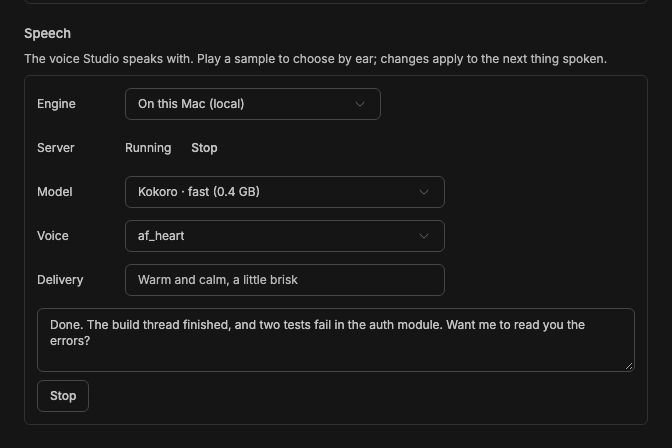
A staged capture from the BB Studio README: Speech on the local engine, playing a sample. The sample text is made up.
What broke when it talked
Most of the lessons came from listening to it. Each bug was small, and each one shows something about putting a voice on an agent.
- The voice changed mid-reply. With no voice set, Fish models seem to pick one per request, and a reply is spoken in pieces, one request each. Patrick heard two people answer him. The fix gives Fish models a fixed voice.
- It read the interface aloud. BB agents end many replies with a hidden line that the app draws as buttons. The voice read it anyway. Spoken text now drops those lines, along with markdown, code and links.
- Two replies played at once. Reloading the plugin during development left an old copy still running in the window, and both played. Now there is one player per window, and a new reply cuts off the old one.
- It was too slow. Speech now has a speed control that plays faster without raising the pitch, so it works the same for every engine.
- Silence looked like success. Given a bad voice name, mlx-audio answers "OK" with no audio. Studio now reports an empty reply as an error, so it doesn't just go quiet.
Then there was length. An agent that writes for a screen talks too much. Voice threads tell their agent to answer in a few spoken sentences, with no lists or code, and to say file paths "the way a person would". A thread's instructions only reach a running session when it starts, so every message you speak also carries a hidden note to answer conversationally. Patrick asked what happens when he turns that off mid-conversation, since the agent has already seen the earlier notes. The first spoken message afterwards now carries a one-time note that says so.
Speech-to-text set a different limit. BB transcribes finished clips, not a live stream, so voice mode cuts shorter clips at pauses, about every 2.5 seconds. Your words appear in the message box phrase by phrase, a beat behind you. Word-by-word text would need a streaming transcription model, which nobody has added.
Voice is a property of a thread
The interface took more rework than the engines did.
The first build followed the plan: a Studio Voice page with its own sidebar entry, a dedicated agent on a fast model, and a live call view. Patrick called it horrible and pointed at ChatGPT, where voice lives inside the chat. A voice session shouldn't be a separate kind of Studio item, he said. It should just be a thread. The agent's rework started putting ChatGPT's glowing orb into the message box, and he stopped that too: the orb was a lame interface, and he wanted design options first.
So it went through BB Studio's Design tool. The agent drew four options inside BB's normal thread view: live captions above the message box, the reply lighting up sentence by sentence in the conversation itself, a hold-to-talk bar that replaces the text box, and a tray of the threads the voice chat is waiting on. Design's automatic reviewer checked each round. In round one it found all four broken at phone width, with the desktop sidebar squeezing the chat into a sliver. Patrick picked the read-along option, asked for a bar showing his own speech and for his words to stream into the input, and then asked for the waveform to sit next to the mic like the dictation control does. The third round was built.
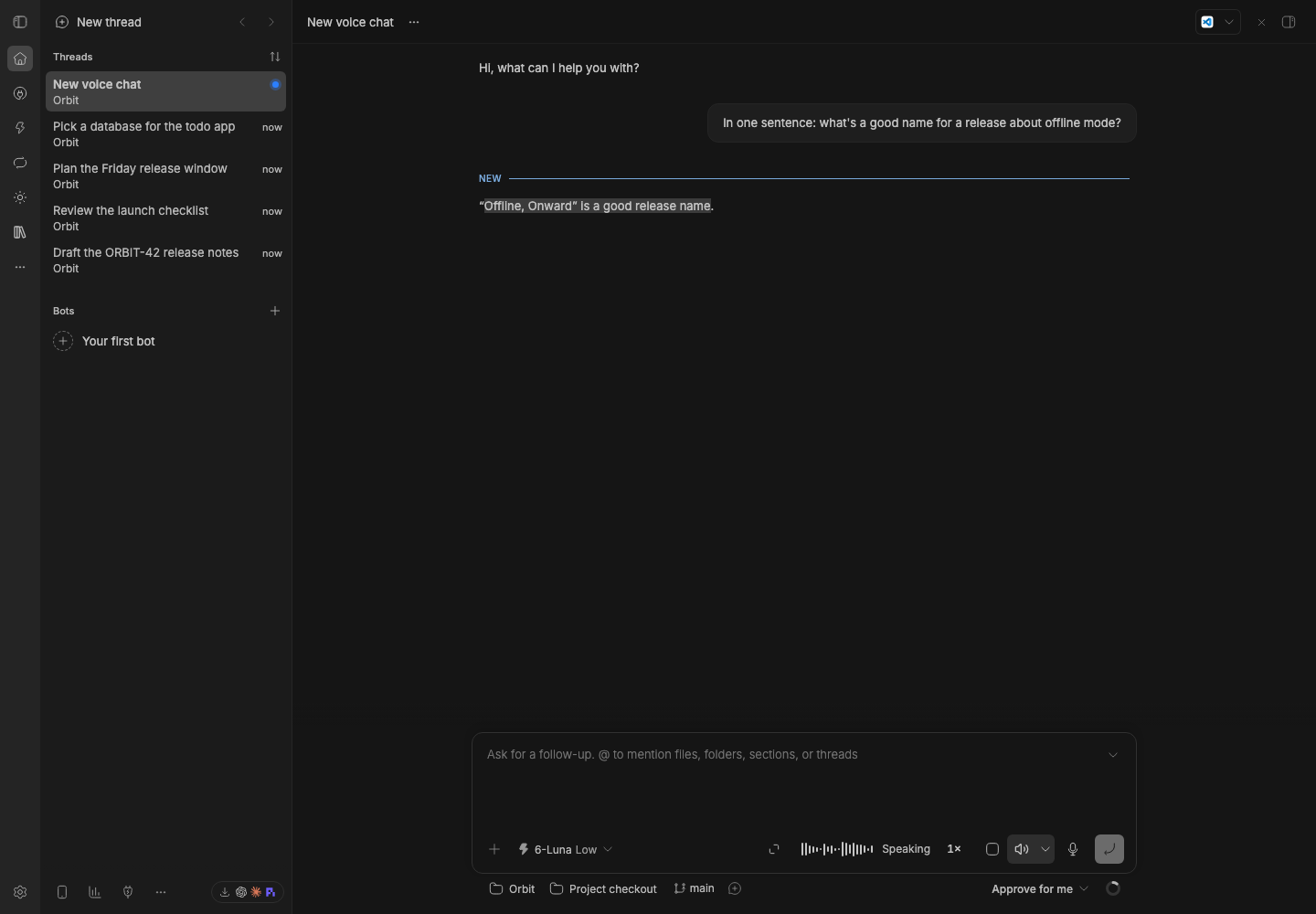
A staged capture from the BB Studio README, October 16: a new voice chat speaking its reply. The words being read are highlighted in the transcript. The "Speaking" label was removed the next day.
Voice mode is now a setting on any thread: a speaker button beside the mic. A caret beside it opens a small menu with the engine, voice, speed and the conversational switch. New voice chat starts a thread with it on. It runs on a fast model, with tools to hand real work to the Bot or another thread and to say in a sentence what came back. That is a small version of the fast front layer from the real-time plan. Every message also got a Read aloud button.
Two more passes came from using it. On his phone, Patrick asked for the words beside the controls to go. "Listening" and "Speaking" disappeared on both desktop and iPhone, so the icons speak for themselves. A day later, with dictation and voice mode both on, the composer showed two timers and two waveforms, and voice mode's waveform mixed his voice with the agent's. The fix was one recording surface. Push-to-talk is the default, and holding without talking switches to hands-free. Your voice is red. The agent's is blue, in the same spot, and only while it speaks.
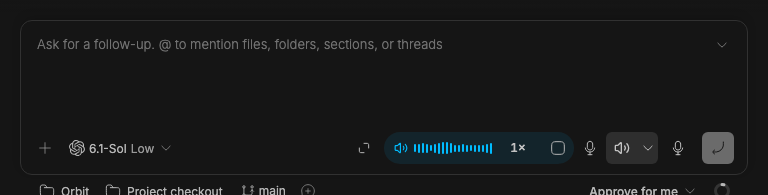
A staged capture from the BB Studio README, October 19: the agent's voice in blue. The state is set by a test fixture, because the capture browser can't play real speech.
The iPhone app got the same model. Voice mode replaced the on-device voice chat. Every old way into it, including a Siri shortcut, a widget and a Control Center button, now starts a voice chat thread.
Where it stands
It works. Patrick tested it on his phone the day after it shipped, and the follow-up fixes came from that use. His verdict is that it's okay. That is less than he hoped for when he asked for a fast, live conversation.
The trade is clear. Real time needed a separate, per-minute voice model and a separate place to talk. What he has keeps the agent he already uses, with its tools and memory, and adds ears and a voice. It also ended up close to the simplest design he saw in the marketplace: dictate, send, hear the reply. The parts that took real work were picking a voice that is cheap, fast and consistent, and making voice a setting rather than a page.
The real-time version is still unbuilt. A streaming transcription model, a fast front layer, and interruptions that feel natural are all still on the table. For now, what he has is a thread that listens and talks back.